Building Better Creative Workflows with Figma and Weave
Figma Weave: when image and video generation becomes a workflow In late October 2025, Figma announced the acquisition of Weavy, a Tel Aviv company founded in 2024, and renamed it Figma Weave . The price was not disclosed; around twenty…

Jean-Baptiste DuquesneSEO, GEO & content operations · Published 15 July 2025 · Updated 11 October 2026
Figma Weave: when image and video generation becomes a workflow
In late October 2025, Figma announced the acquisition of Weavy, a Tel Aviv company founded in 2024, and renamed it Figma Weave. The price was not disclosed; around twenty people joined Figma. The tool remained available as a standalone product, with the stated aim of bringing it progressively closer to the rest of the Figma platform.
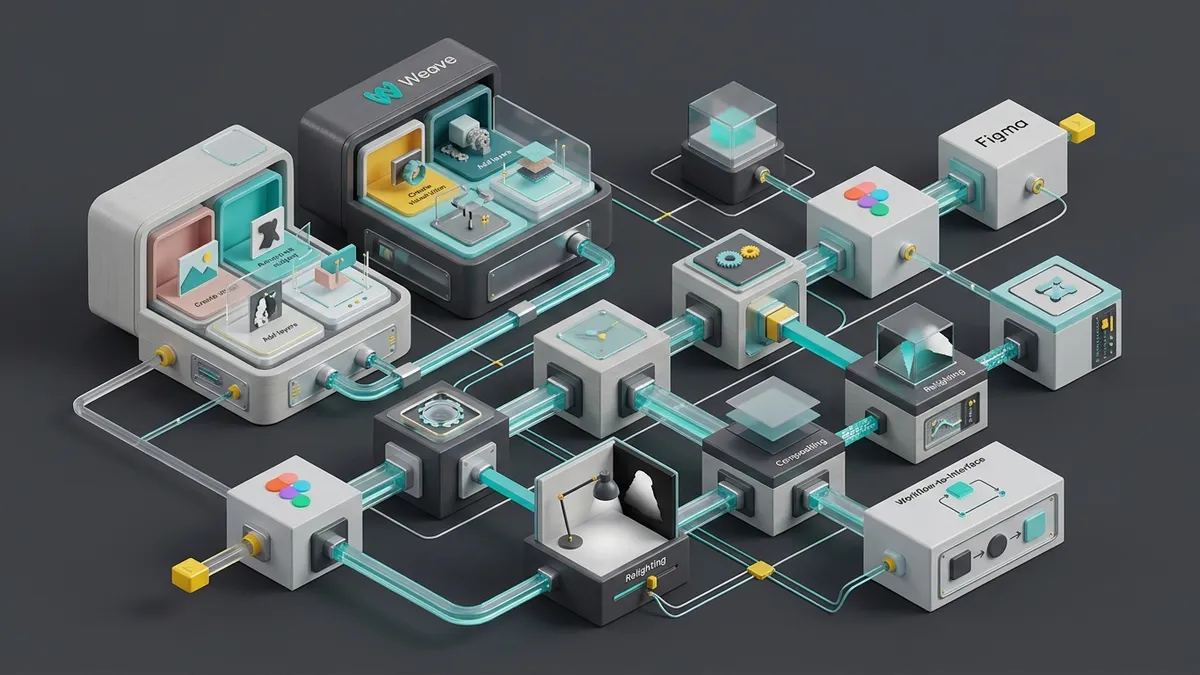
The idea fits in one sentence: instead of chaining isolated prompts across several tools, you build a sequence of connected "nodes" on a canvas, each handling one step: generate an image, describe it, cut it out, change the lighting, animate it. The output is no longer a single visual but a process you can rerun, modify and share. Mind the name: this is not Weavy, the vendor of in-app messaging APIs, which is a different company.
What the node-based approach changes
Several models on one canvas
Figma Weave does not rely on a single in-house model. The platform gives access, in one place, to image and video models from several vendors: Google, OpenAI, Black Forest Labs, Runway, Luma, Kling, Bytedance and Recraft, among others. You can send the same prompt to several models, compare the outputs side by side, keep the best one and plug it into the next step. For a creative team, that avoids the pile of subscriptions and back-and-forth described in our article on VFX and AI retouching. The catalog changes quickly: the official site has the current list.
Editing tools, not just generation
Pure generation quickly shows its limits when you need to fix one detail without redoing everything. Weave therefore adds editing nodes: inpainting and outpainting, relighting, upscaling, mask and depth-map extraction, cropping, painting, plus layer compositing with type and blend modes. It is the same shift seen with Google's Nano Banana: AI becomes a retouching tool, not only a machine for producing images.
From workflow to shared tool
A finished workflow can be turned into a simplified interface: the nodes disappear and only the few useful fields remain, such as the product, the setting or the format. An art director designs the recipe once; the rest of the team uses it without touching the wiring. This is the point organizations care about most, because it turns individual know-how into a reusable process. The vendor also highlights SOC 2 Type II certification.
Why Figma is interested
Figma is the reference tool for interface design and collaborative prototyping. What it lacked was media production: product photos, mood visuals, short videos. With Weave, the company is betting that creatives want control over AI, not just a text box. Its CEO, Dylan Field, praised the balance between simplicity and power in the node-based approach. The deal is part of a wider movement: Krea AI, Runway and others are heading the same way, each with its own way of combining models and editing tools.
Use cases for marketing and creative teams
- Exploring directions: generate several visual routes for a campaign in parallel, then refine the one that is chosen.
- Product visuals: place a packshot in different settings and adjust light and angle without a new shoot.
- From image to video: animate an approved visual with a video model, comparing several renders.
- Brand style: lock into a workflow the references, prompts and settings that give a consistent look from one visual to the next.
Limits to be aware of
Node logic takes time to learn: it speaks more to technical profiles and people used to 3D or compositing than to a product manager. Credit-based billing means watching consumption as soon as you multiply tests and video. Rights questions are those of any generative AI: the terms of each model, commercial use, resemblance to existing works.
Above all, a workflow guarantees a method, not compliance with brand guidelines: nothing stops it from producing a visual with the wrong logo, the wrong typeface or a missing legal line. Finally, at the time of the announcement the tool was still a product separate from Figma Design; check how far the integration has come before building a process on it.
Brandeploy: from generated asset to rolled-out campaign
Figma Weave answers the question "how do we create the right visual?". The next one remains: how do you adapt it to every format, language and market without losing brand consistency? That is the role of Brandeploy, a creative automation and brand management platform. Approved visuals feed smart templates in which logos, typefaces, colors and legal lines are locked; local teams adapt copy and formats within that frame, with an approval flow. AI serves exploration and asset creation; the platform handles production at scale and compliance. To see how to organize this chain in your context, book a demo.
FAQ
What is Figma Weave?
Figma Weave is the name given to Weavy after its acquisition by Figma, announced in late October 2025. It is an AI creation tool organized as nodes on a canvas: it brings together image and video models from several vendors and editing tools (inpainting, relighting, masks, upscaling) to build reusable workflows.
How is Figma Weave different from a standard image generator?
A standard generator starts from a prompt and produces one isolated result. Weave chains connected steps: you compare several models, make local corrections, animate, then rerun the same process on another product. The workflow can also be converted into a simplified interface for the rest of the team.
Is Figma Weave enough to guarantee brand consistency?
No. It helps achieve a consistent style, but it does not control logos, typefaces, legal lines or the adaptations by format and market. Those safeguards belong to a creative automation platform such as Brandeploy, which locks brand elements into templates and frames the approval process.
Which AI models can you use in Figma Weave?
Figma Weave does not rely on a single in-house model. It gives access, on one canvas, to image and video models from several vendors, including Google, OpenAI, Black Forest Labs, Runway, Luma, Kling, Bytedance and Recraft. You can send the same prompt to several models, compare the outputs side by side and plug the best one into the next step. The catalog changes quickly, so check the official site for the current list.
What are the limits of Figma Weave?
Node logic takes time to learn and suits technical profiles more than product managers. Credit-based billing means watching consumption as soon as you multiply tests and video. Rights questions are those of any generative AI: model terms, commercial use and resemblance to existing works. At the time of the announcement, Weave was also still separate from Figma Design, so check how far the integration has come before building a process on it.

Written by
Jean-Baptiste Duquesne
SEO, GEO & content operations
Web pioneer since 1995, founder of the recipe site 750g.com (sold to Webedia), now industrialising SEO and GEO content production with AI.
Ready to scale your content production?
Book a demo