
Bulk visual creation: one Excel row, one creative
Import an Excel file and Brandeploy generates one creative per row from a brand template, ready to be adapted and approved.
Book a demoBulk visual creation means automatically producing many creatives from a template and a data table. In Brandeploy, the “Batch create” feature reads an Excel (XLS) file: each row becomes a creative. It is the production base for DCO-style output at scale, for a catalogue, a promotional campaign or several markets.
These brands and agencies trust us









Batch create: one Excel file, hundreds of creatives
The “Batch create” feature starts from an Excel file. Each row describes a creative: a product, a price, a tagline, an image. Brandeploy generates as many creatives as there are rows. You prepare the data in a spreadsheet your teams already know.
- Import of an Excel (XLS) file
- One row in the file = one creative
- Data prepared in a spreadsheet, with no extra tool
- Production suited to high volumes and DCO use
Brand templates as the production base
Each generated creative is based on a template designed for your brand. Locked layers protect the logo, layout and mentions. Named fields (text, image, video, Lottie animation, sound) receive the values from the file. The result follows the brand guidelines, whatever the volume produced.
- Locked layers for the fixed elements of the guidelines
- Named fields for variable content
- Colours, fonts and logos taken from the brand settings
- Template categories: Display, Social, E-commerce
Automatic size adaptation
A Brandeploy creative has a master and synchronised sizes. Creatives generated from the Excel file follow the same logic. Each row can therefore exist as a square, a story, a billboard or a skyscraper. You can then adjust a specific size if a text is too long.
- Master and synchronised sizes for each creative
- Preset formats: 1080x1080, 1080x1920, 970x250, 120x600, 1200x627, etc.
- Manual adjustment possible on a given size
- Export as image, PDF, GIF, MP4 or HTML5 for banners
Catalogue, promotion and market use cases
Bulk creation fits situations where the same layout repeats with different data. A product catalogue, a promotional campaign or a multi-country rollout are the most common examples. The Excel file becomes the single source of the campaign.
- Catalogue: one visual per product reference, with image, name and price
- Promotion: one creative per offer, store or period
- Markets: one row per country, with local texts
- Automatic translation into more than 80 languages as a complement
Review and approval of generated creatives
Producing at volume means keeping control of quality. Generated creatives enter the Brandeploy workflow: projects, folders, statuses and comments. Each market can approve its creatives before release.
- Configurable review and approval statuses
- Comments on creatives
- Due dates and status statistics
- Availability workflow per market
How it works
- 1Choose the brand template to use as the base, with its sizes.
- 2Prepare the Excel file: one row per creative, one column per variable content.
- 3Run “Batch create”: Brandeploy generates one creative per row.
- 4Check the creatives, adjust a size if needed, then get them approved in the workflow.
- 5Export everything in the formats your channels expect.
Customer proof
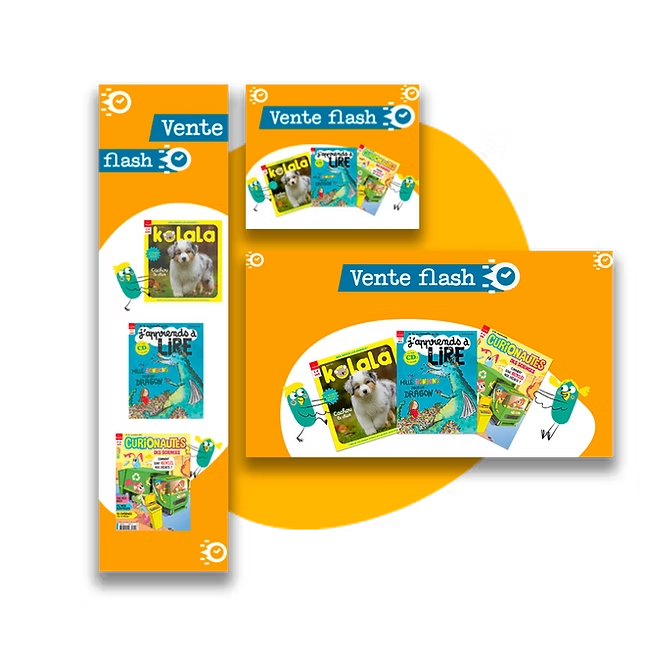
Bayard has cut the time spent creating its monthly banner sets by 80% with Brandeploy. This kind of repetitive production, with content that changes every month, shows the value of automating rather than redoing every visual.Read the Bayard case study
FAQ
How do I generate visuals from an Excel file?
In Brandeploy, you choose a template, then import an Excel file with the “Batch create” feature. Each row in the file becomes a creative. The values in the row fill the template's variable fields.
What is the difference between bulk creation and DCO?
DCO (Dynamic Creative Optimization) refers to producing many creative variants adapted to audiences or contexts. Bulk creation is its production base: it generates these variants from data. Brandeploy produces the creatives; they are then delivered through your advertising tools.
Do the generated visuals follow the brand guidelines?
Yes, because every creative starts from a brand template. Fixed elements are locked and only the planned fields change. Colours, fonts and logos come from the brand settings.
How many formats do I get for each row?
Each creative has a master and the synchronised sizes defined for it. One row can therefore produce a square, a story and several display banners. The number depends on the sizes you choose.
Can I produce visuals for several countries at once?
Yes. You can plan one row per country with local texts, or use automatic translation into more than 80 languages. Markets then have their own availability workflow.
Bring your product or promotion file and see how many creatives it can generate: book a demo.