
AI design agent: describe it, the agent creates it on brand
With Magic Create, you write a request in natural language and an agent orchestrates the creation from your templates and brand guidelines.
Book a demoMagic Create is Brandeploy's AI design agent. You describe what you want to create, and the agent produces the creative based on your brand's templates and guidelines. The result stays editable and goes through your approval process before any release.
These brands and agencies trust us







Magic Create: the brief in natural language
Magic Create starts from a simple question: “Tell me what you want to create”. You answer as you would write a brief for a designer. The agent interprets the request and launches the creation. Every request is kept in a history.
- Request written in natural language, with no technical settings
- An agent that orchestrates the creation end to end
- Request history to find and resume work
- Pay-as-you-go usage, with credits
Orchestration from your templates and brand guidelines
The agent does not create in a vacuum. It relies on the Brandeploy template library and on your brand's own templates. It uses the guideline elements saved in the platform. Locked layers in a template remain protected.
- Brand templates and the Brandeploy template library
- Brand colours, fonts, logos, icons and illustrations
- Locked layers: logo, mentions and layout protected
- Template categories: Display, Social, E-commerce, SEO/Text, Briefs
AI skills configurable per brand
Each brand can have its own AI agents and skills. You choose how much the AI intervenes depending on the need. The agent can take inspiration from a template, leave a free creation in the editor, or orchestrate a full generation.
- Creation inspired by an existing template
- Free creation in the editor, with AI assistance
- Full generation orchestrated by the agent
- Settings defined brand by brand, with possible inheritance within a group
On-brand visual generation and product retouching
Brandeploy's AI generates on-brand visuals and removes the background from product visuals. It can also turn a flat image into a creative with editable layers. You stay in control of every element after generation.
- Generation of visuals that follow the brand guidelines
- Background removal on product visuals
- “Layers from image” to make a flat image editable
- Dedicated AI templates: “AI product page”, “AI SEO article & image”
Adapting and translating the generated creative
A creative produced by the agent is a Brandeploy creative like any other. It has a master and synchronised sizes. You adapt it to other formats and translate it for your markets.
- Master and synchronised sizes, each size adjustable
- Preset formats: 1080x1080, 1080x1920, 1920x1080, 970x250…
- Automatic translation into more than 80 languages
- Exports as images, MP4 video, GIF, PDF and HTML5
A human approves before release
The agent proposes, your team decides. Creatives go through review and approval statuses that you configure. Each user's rights still apply.
- Configurable statuses, for example Review and Approval
- Comments directly on the creative
- “Create, comment, edit” rights per user
- Due dates and status statistics
How it works
- 1You open Magic Create and describe what you want to create, in natural language.
- 2The agent selects the brand's templates and guideline elements, then orchestrates the creation.
- 3You retouch in the editor if needed: texts, images, editable layers.
- 4You adapt the creative to other formats and translate it for your markets.
- 5Your team reviews and approves, then you export the files.
Customer proof
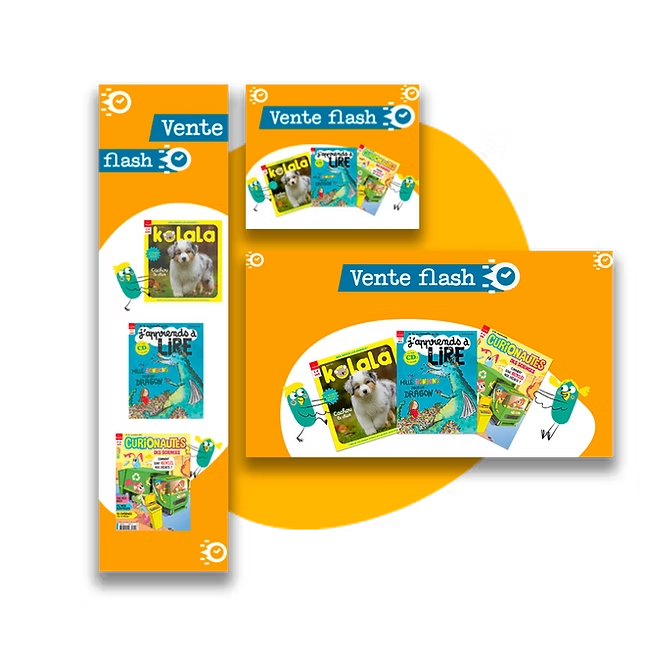
Bayard uses Brandeploy to produce its monthly banner sets from templates. The company has cut the time spent creating these banners by 80%. Read the Bayard case.
FAQ
What is an AI design agent?
It is an AI that does more than generate an image. It understands a request, chooses the right elements and chains the creation steps. In Brandeploy, the Magic Create agent works from your templates and brand guidelines.
How does the agent follow the brand guidelines?
It relies on the templates and brand elements saved in the platform: colours, fonts, logos, icons. A template's locked layers cannot be changed. Final approval remains human.
Do I need to write a technical prompt?
No. You describe your need like a brief, in natural language. The request history lets you reuse a wording that worked well.
How is Magic Create billed?
Magic Create works with credits. Each generation uses credits. Your Brandeploy contact will present the volumes suited to your usage.
Can the AI be configured differently for each brand?
Yes. AI agents and skills are configured per brand. In a multi-brand group, settings can be inherited and then adjusted for each brand.
Related features
Discover Magic Create on your own templates: book a demo.