HTML5 banner version management
In the fast-paced world of digital advertising, launching a single creative is rarely enough. A standard campaign often requires dozens, or even hundreds, of variations to account for different screen sizes, languages, and audience…

Jean-Baptiste DuquesneSEO, GEO & content operations · Published 23 June 2026 · Updated 12 October 2026
In the fast-paced world of digital advertising, launching a single creative is rarely enough. A standard campaign often requires dozens, or even hundreds, of variations to account for different screen sizes, languages, and audience segments. Effective HTML5 banner version management has become the backbone of successful display strategies, shifting from a simple file-saving task to a critical workflow requirement for global brands and agencies.
Why Version Control is Essential for Modern Campaigns
The stakes for display advertising are higher than ever. A minor error in a price point or an outdated legal disclaimer can lead to significant financial or reputational damage. As creative ambition grows, the technical complexity of assets increases. This is why a robust system is necessary.
Reducing Manual Errors and "File Hell"
Without a dedicated system, creative teams often fall into the trap of naming files "banner_final_v2_FINAL.zip." This lack of structure leads to the wrong assets being uploaded to the DSP (Demand Side Platform). Proper versioning ensures that every stakeholder knows exactly which file is the approved master and provides the necessary structure for high-quality output.
Facilitating Global Localization
For brands operating in multiple markets, versioning is what allows a global campaign to stay consistent while feeling local. Managing dozens of languages requires a system that can swap out text and assets within the HTML5 container while keeping the underlying animation logic intact.
How the Versioning Process Works
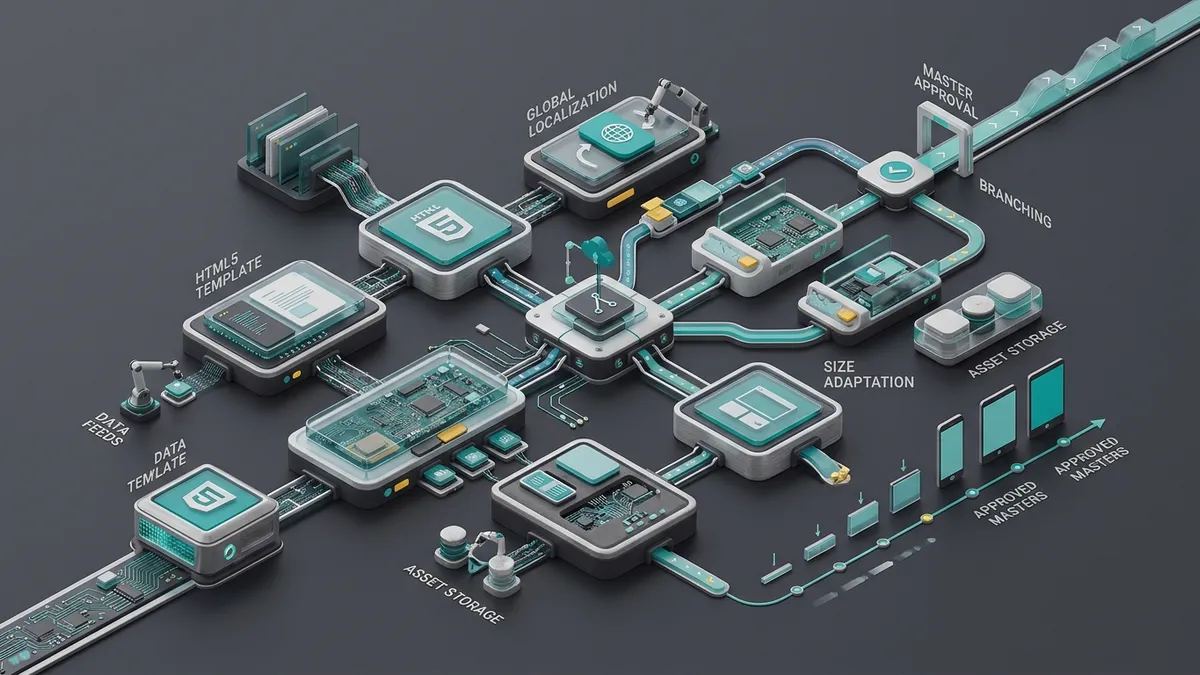
Modern HTML5 banner version management typically follows a structured workflow that mirrors software development. It begins with a "master" template that contains the core animations and brand elements. To select the right platform for this workflow, it is useful to review the best HTML5 banner creation tools currently available. From there, the process branches out into several technical steps. To optimize this stage, many teams now learn how to automate banners to streamline the creation of these master versions before they even reach the versioning pipeline. This foundation is essential when you need to generate multi-format HTML5 banners while maintaining version control across every unique layout.
Branching and Iteration
When a change is requested, a "branch" is created. This allows developers to work on new animations or design tweaks without affecting the live version. Once the changes are approved, they are merged back into the main file. This prevents the "broken link" syndrome where a designer accidentally deletes a critical piece of code.
Automated Quality Assurance (QA)
Advanced versioning tools often include automated QA checks. They can verify that the file weight remains under the ad server's limit (usually 150kb to 200kb) and that all click-through URLs are functioning correctly across every version. Understanding how to optimize HTML5 banner weight is crucial during this phase to ensure that every version loads quickly without sacrificing visual quality. This helps avoid small technical glitches that can stop a campaign from going live.
Best Practices for Managing Your Advertising Assets
To succeed with HTML5 banner version management, teams must move away from decentralized folders and toward integrated platforms. Consistency is the primary goal. You should use a clear naming convention that includes the dimensions, the language, and the iteration date.
Furthermore, integrating your versioning tool with your communication stack can significantly speed up the production cycle. For example, connecting your workspace tools can allow for faster feedback loops on copy changes that then sync with your banner versions. Always keep a backup of previous versions, as campaign requirements can change mid-flight, necessitating a "rollback" to an earlier creative state.
The Future of Versioning and Automation
As we move toward hyper-personalized content, the number of banner versions will only grow. Static version management will no longer suffice; instead, we will see the rise of dynamic creative optimization (DCO), where versioning happens in real-time based on user data. Achieving success in this environment often requires mastering dynamic HTML5 banner personalization to ensure relevance across thousands of unique impressions. This evolution requires a foundation of clean, organized code and a flawless historical record of all creative iterations.
Advertisers must look toward how their creative assets will be connected and deployed across an increasingly fragmented web. The organizations that master versioning today will be the ones capable of scaling their digital presence tomorrow without increasing their overhead costs.
About Brandeploy
Brandeploy is a leading creative automation and brand management platform specifically designed to handle the complexities of large-scale display campaigns. By automating the production and localization of digital assets, Brandeploy empowers marketing teams to maintain perfect control over their HTML5 banner version management. The platform centralizes the creative workflow, enabling seamless updates across thousands of ad variants while ensuring strict brand compliance and technical accuracy. Book a demo of the Brandeploy platform to see it in action.
FAQ
What is HTML5 banner version management?
HTML5 banner versioning is the process of managing multiple iterations and variants of a display ad. This includes tracking changes between design drafts, managing localized versions for different regions, and organizing different sizes (e.g., 300x250, 728x90) of the same creative concept. Effective versioning ensures that the correct, approved assets are deployed to the ad server without manual errors.
Why is manual versioning risky for digital ad campaigns?
Manual versioning often leads to 'file name hell' (e.g., final_v2_new.zip), resulting in the wrong ads being published. It also lacks a clear audit trail, making it difficult to revert to previous designs or verify which stakeholder approved a specific creative. Automated tools solve this by centralizing all iterations in a single platform with clear history logs and unified asset control.
Can versioning tools help with ad personalization and localization?
Yes, modern version control systems allow teams to fork a master creative into dozens of localized or personalized versions simultaneously. When a global update is needed, such as a price change, these tools can push the update across all versions at once, ensuring brand consistency and legal compliance without the need to manually edit every individual HTML file.
How does branching work in HTML5 banner version management?
When a change is requested, a branch is created from the master template. Developers can then work on new animations or design tweaks without affecting the live version. Once the changes are approved, they are merged back into the main file. This workflow mirrors software development and prevents a designer from accidentally deleting a critical piece of code in the approved banner.
What naming convention should I use for HTML5 banner versions?
Use a clear and consistent naming convention that includes the banner dimensions, the language and the iteration date. This tells every stakeholder which file is the approved master and avoids uploading the wrong asset to the ad platform. You should also keep a backup of previous versions, because campaign requirements can change mid-flight and require a rollback to an earlier creative.

Written by
Jean-Baptiste Duquesne
SEO, GEO & content operations
Web pioneer since 1995, founder of the recipe site 750g.com (sold to Webedia), now industrialising SEO and GEO content production with AI.
Ready to scale your content production?
Book a demo