Headless DAM: definition, API-first architecture and use cases
What a headless, API-first DAM is, how it differs from a classic DAM, its main use cases, its trade-offs and when a marketing team needs one.

Jean-Baptiste DuquesneSEO, GEO & content operations · Published 25 October 2026 · Updated 13 November 2026
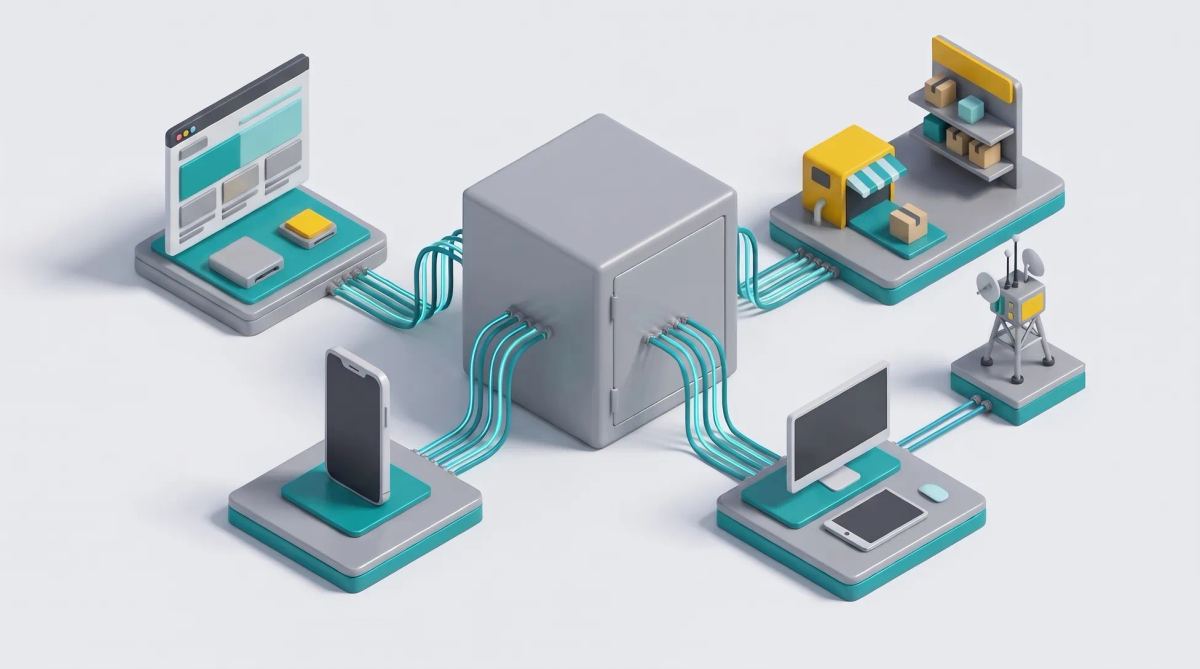
In short: a headless DAM separates the asset repository (storage, metadata, rights) from any presentation interface. Assets are exposed and delivered through APIs to any channel: website, app, e-commerce, creative tools. It suits organizations building a composable stack with developers on hand. If your marketing teams mostly need a usable library and on-brand production, a classic DAM with a good API, connected to your creative tools, is often enough.
What is a headless DAM?
In a classic DAM, people use the DAM's own interface to search, download and share assets. In a headless DAM, the interface is optional: the core is a repository of assets and metadata, and every other system reaches it through APIs. A website pulls the right image size, an app displays the latest product visual, a creative tool uses the current logo, all from the same source. The term borrows from the headless CMS, which separates content from page templates.
Headless DAM vs classic DAM
| Criterion | Classic DAM | Headless DAM |
|---|---|---|
| Main interface | The DAM's own user interface | APIs; interface optional |
| Main users | Marketing and creative teams | Developers and connected systems |
| Delivery to channels | Download and share links | API calls and CDN delivery |
| On-the-fly transformations | Sometimes | Usually central (sizes, formats, crops) |
| Integrations | Pre-built connectors | Any system that can call an API |
| Skills required | Business users | Developers for setup |
The difference lies in how assets are accessed, not in how they are stored. Many modern DAMs offer both: a business interface and a complete API.
How API-first architecture works for assets
- Storage and metadata: files, descriptions, tags, rights, expiry dates.
- API layer: search, upload, update, permissions. REST or GraphQL APIs let other systems query and modify assets; webhooks notify them when something changes.
- Transformation and delivery: the right size and format generated on request and served through a CDN, a network of servers that delivers files fast everywhere.
- Consuming channels: website, app, e-commerce, PIM, creative tools.
For the CMS equivalent, read headless content management.
Main use cases
- Website and app fed by the same image source, with automatic resizing.
- E-commerce and PIM: product visuals synchronized with product data.
- Creative tools that use up-to-date assets from the DAM, and send finished creatives back. See DAM and creative platform integration.
- Multi-brand and multi-country delivery from one repository.
- Automation: generating variations through APIs. Image delivery platforms such as Cloudinary are built around this model; read our Cloudinary analysis.
Some DAM vendors now also expose their libraries to AI assistants. Acquia DAM, for example, lists nearly 300 integrations and an MCP server on its product page.
Benefits and trade-offs
Benefits
- Flexibility: any channel can use the assets.
- One source of truth for every system.
- A stack that evolves without migrating assets.
Trade-offs
- Developers are needed to build and maintain integrations.
- The business interface can be limited.
- Integration costs add up.
- Metadata governance becomes critical: bad tags break every channel at once.
Do you need a headless DAM? A decision checklist
- How many channels must the DAM feed automatically?
- Do you have development resources for integrations?
- Do marketing teams need a full interface every day?
- Is your stack already composable (headless CMS, PIM, e-commerce platform)?
Three options usually come out of this checklist: a classic DAM with an API, a headless DAM, or a DAM connected to your creative tools. Read our DAM guide and cloud DAM.
Headless DAM and creative production
A headless DAM does not produce content. To keep creatives on brand, connect it to creative tools so templates always use up-to-date assets and finished variations flow back into the repository after approval.
Brandeploy and your DAM
Brandeploy is a creative automation platform with a built-in DAM. It connects to Bynder when your assets already live there, and offers an API for creative generation. Locked templates use up-to-date assets, variations are approved, then centralized. Learn more about Brandeploy integrations or book a demo.
FAQ
What does headless mean in digital asset management?
It means the asset repository is separated from any presentation interface. Assets and metadata are accessed and delivered through APIs, so any website, app or tool can use them.
Is a headless DAM the same as a composable DAM?
They are close. Headless describes API-first access without a mandatory interface; composable describes a stack built from interchangeable components. A headless DAM is often one building block of a composable architecture.
Do marketing teams need developers to use a headless DAM?
Developers are needed to set up and maintain integrations. Once connected, marketing teams can work through the tools fed by the DAM, or through the DAM's interface if it has one.
Can a headless DAM work with a headless CMS and a PIM?
Yes, that is a typical use case: the CMS manages content, the PIM manages product data and the headless DAM supplies the assets to both through APIs.
What is the difference between a headless DAM and a CDN for images?
A CDN delivers files quickly. A headless DAM also manages metadata, rights, versions and search, and usually relies on a CDN for delivery.

Written by
Jean-Baptiste Duquesne
SEO, GEO & content operations
Web pioneer since 1995, founder of the recipe site 750g.com (sold to Webedia), now industrialising SEO and GEO content production with AI.
Ready to scale your content production?
Book a demo