
Canva AI suite (Magic Studio): tools, pros and cons
Canva has fundamentally transformed the graphic design landscape by integrating a comprehensive artificial intelligence ecosystem known as Magic Studio . This suite is designed to democratize design, enabling millions of users to produce…
Rédaction Brandeploy · Published 06 May 2025 · Updated 12 October 2026
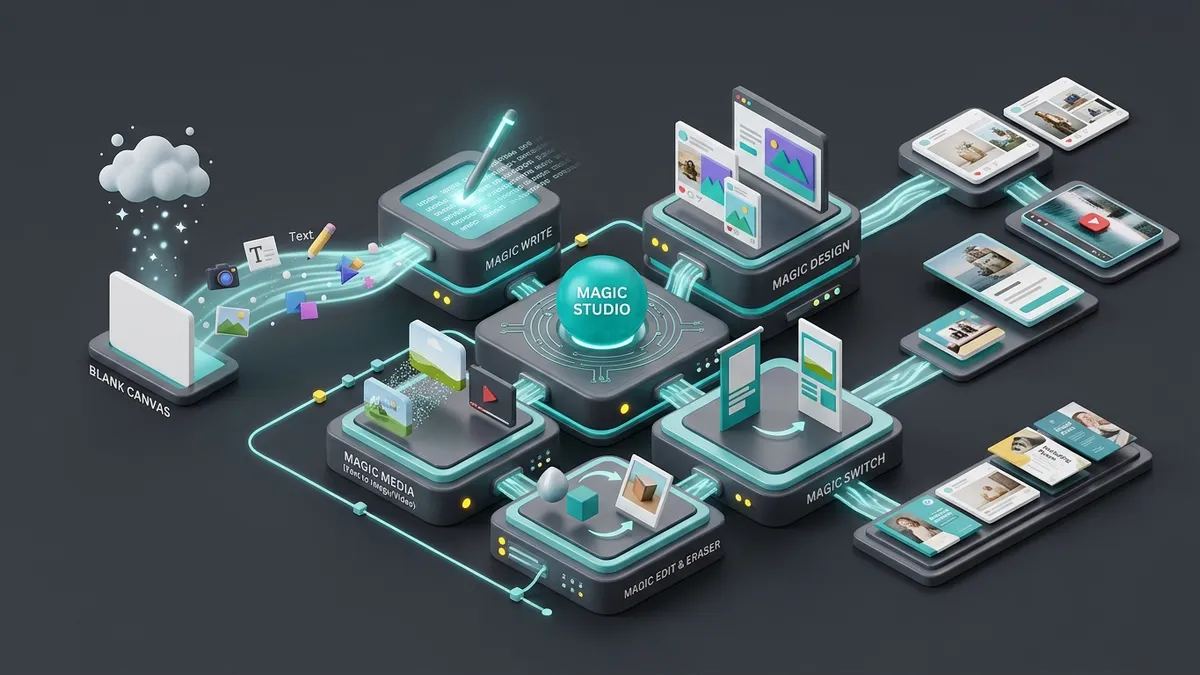
Canva has fundamentally transformed the graphic design landscape by integrating a comprehensive artificial intelligence ecosystem known as Magic Studio. This suite is designed to democratize design, enabling millions of users to produce professional-grade visuals without specialized technical training. By embedding AI algorithms directly into the user interface, Canva simplifies the transition from a blank page to a finished asset.
Key Features of the Canva Magic Studio
The suite comprises several "Magic" tools that automate different stages of the creative process. These tools are built to handle text, imagery, and layout, often providing a starting point for AI and content creation that users can then refine manually.
Core Tools and Functionalities:
Magic Write: A generative text assistant that helps draft social media copy, blogs, and presentations. It is particularly effective for marketing teams that want to streamline the copywriting phase.
Magic Design: This tool allows users to upload media or type a prompt to receive fully formatted designs, including presentations and social posts, tailored to their specific context. Because these designs are increasingly sophisticated, exploring brand narrative techniques ensures that your automated layouts remain cohesive and impactful. Mastering how to phrase these requests is increasingly important, as prompt engineering has become a vital skill for achieving high-quality results from generative tools.
Magic Media: This includes powerful "Text to Image" and "Text to Video" capabilities. By leveraging a diffusion model, it generates unique visuals from simple descriptions. Other platforms are also expanding these boundaries, such as Krea AI, which offers a suite of creative tools supercharged by real-time AI to enhance visual generation.
Magic Edit and Eraser: These features allow for complex photo manipulation. "Magic Edit" can swap objects in a photo, while the "Magic Eraser" removes unwanted distractions with a single click and uses AI to reconstruct the background.
Magic Switch: Formerly known as Magic Resize, this tool automates resizing by converting one design format into several others (e.g., a flyer into a LinkedIn banner) while maintaining layout integrity.
Advantages: Speed, Accessibility, and Workflow Integration
The primary benefit of Canva’s AI is its ability to lower the barrier to entry. High-quality design is no longer gated by expensive software or years of training. For organizations, this means a significant increase in marketing efficiency and the ability to scale output without exponentially increasing costs.
By using these tools, teams can allow non-designers to contribute meaningfully to brand visuals. However, it is vital to monitor your internal capabilities to make sure an AI skills gap does not grow inside your marketing team as these tools become more complex. This is especially useful in environments where data insights need to be visualized quickly for stakeholders. Furthermore, the all-in-one nature of the platform reduces the need for multiple tool integrations, as most creative needs are met within the same interface. As the industry evolves, efficiency-focused tools like Gemini Flash are also helping developers build faster, more responsive creative experiences.
Limitations: Generic Output and Ethical Considerations
Despite its power, Canva's AI has limitations. The output can sometimes feel generic, lacking the "soul" of human-crafted design. For brands, there is a risk of AI hallucinations where the AI might generate strange artifacts in images or factual errors in text.
Control is another factor. Users seeking the precision found in specialized tools like Midjourney or Photoshop may find Canva’s options too restrictive. Additionally, ethical transparency regarding training data remains a hot topic, as businesses must ensure their own AI ethics policies align with how these platforms operate.
Brandeploy: Ensuring Brand Consistency Beyond Canva
While Canva makes creation easy, it can also lead to "brand drift" where different departments produce inconsistent visuals. Brandeploy solves this by providing a robust governance layer that works alongside Canva. Since research shows that visual consistency increases revenue, Brandeploy allows companies to centralize their global brand guidelines, logos, and fonts. Marketing teams can store pre-approved templates and enforce validation workflows, ensuring that any asset created with Canva AI adheres to the corporate communication strategy. This ensures that the speed of Canva is matched by the precision of professional brand management. Brandeploy is a creative automation and brand management platform that helps enterprise teams scale content production, localization, and campaign deployment while maintaining 100% brand integrity. To see how you can empower your team without losing control, book a demo.
FAQ
What is Canva Magic Studio and how does it work?
Canva Magic Studio is an all-in-one AI-powered creative suite integrated into the Canva platform. It includes tools like Magic Design for automated layouts, Magic Write for text generation, and Magic Media for converting text into images or videos. It aims to simplify complex design tasks for non-professionals using generative AI.
What are the main benefits of using Canva AI for business?
Canva's AI tools provide massive time savings by automating repetitive tasks like resizing and background removal. They help users overcome creative blocks through instant template generation and make professional-looking design accessible to people without formal artistic training, all within a single, familiar interface.
How does Canva AI compare to specialized tools like Midjourney?
While Canva offers ease of use, professional tools like Midjourney or Adobe Firefly often provide higher image resolution and more granular control over specific artistic parameters. Canva is ideal for speed and integration, whereas specialized tools are preferred for high-end, unique creative production.
How can large teams maintain brand consistency when using Canva AI?
To ensure brand consistency, companies should use Canva in conjunction with a brand management platform. This allows teams to use validated templates and pre-approved assets, ensuring that AI-generated content still adheres to specific brand guidelines, colors, and tone of voice across all departments.
Is Canva AI safe for enterprise data and copyright?
Canva has implemented Canva Shield, a collection of safety tools designed to prevent the generation of harmful content. They also offer indemnification for enterprise customers and provide options for users to opt-out of having their content used to train future AI models.
Written by
Rédaction Brandeploy
Ready to scale your content production?
Book a demo